> ## Documentation Index
> Fetch the complete documentation index at: https://docs.macropay.ai/llms.txt
> Use this file to discover all available pages before exploring further.
# Credits
> Prepaid balances for usage-based billing — grant credits, draw them down per event, and bill only the overage
Metered billing is powerful, but a bill that only appears at the end of the month can surprise customers. Credits flip the model: customers hold a **prepaid balance** that gets drawn down as they generate usage. They know what they've paid for up front, and you decide what happens when the balance runs out.
## The mechanics
Every event you ingest accrues against a [Usage Meter](/features/usage-based-billing/meters). Credits sit on that same meter as a positive balance:
1. You grant a customer some number of units (a credit).
2. As events arrive, each unit of usage is deducted from the credit balance first.
3. Once the balance hits **0**, any further usage becomes **overage** — billed against the meter's metered price.
So credits are not a separate ledger. They are a head start on the meter the customer is already metered against.
Macropay is the **Merchant of Record** for every credit you sell. We collect and
remit the correct sales tax or VAT on the prepaid purchase, appear as the seller
on the customer's statement, and absorb PCI scope — so a prepaid balance doesn't
add tax-compliance work on your side.
### Prepaid-only, no overage
Want a hard prepaid model where customers can never run up a surprise bill? **Don't attach a metered price to the product.** With no price on the meter, billing is never triggered — usage simply draws the balance toward 0 and stops mattering once you stop honoring it in your app. The meter still tracks consumption; it just never invoices.
## Granting credits with the Credits benefit
The simplest way to fund a balance is the **Credits benefit**, attached to a product. When a customer acquires that product, the benefit tops up their meter balance automatically.
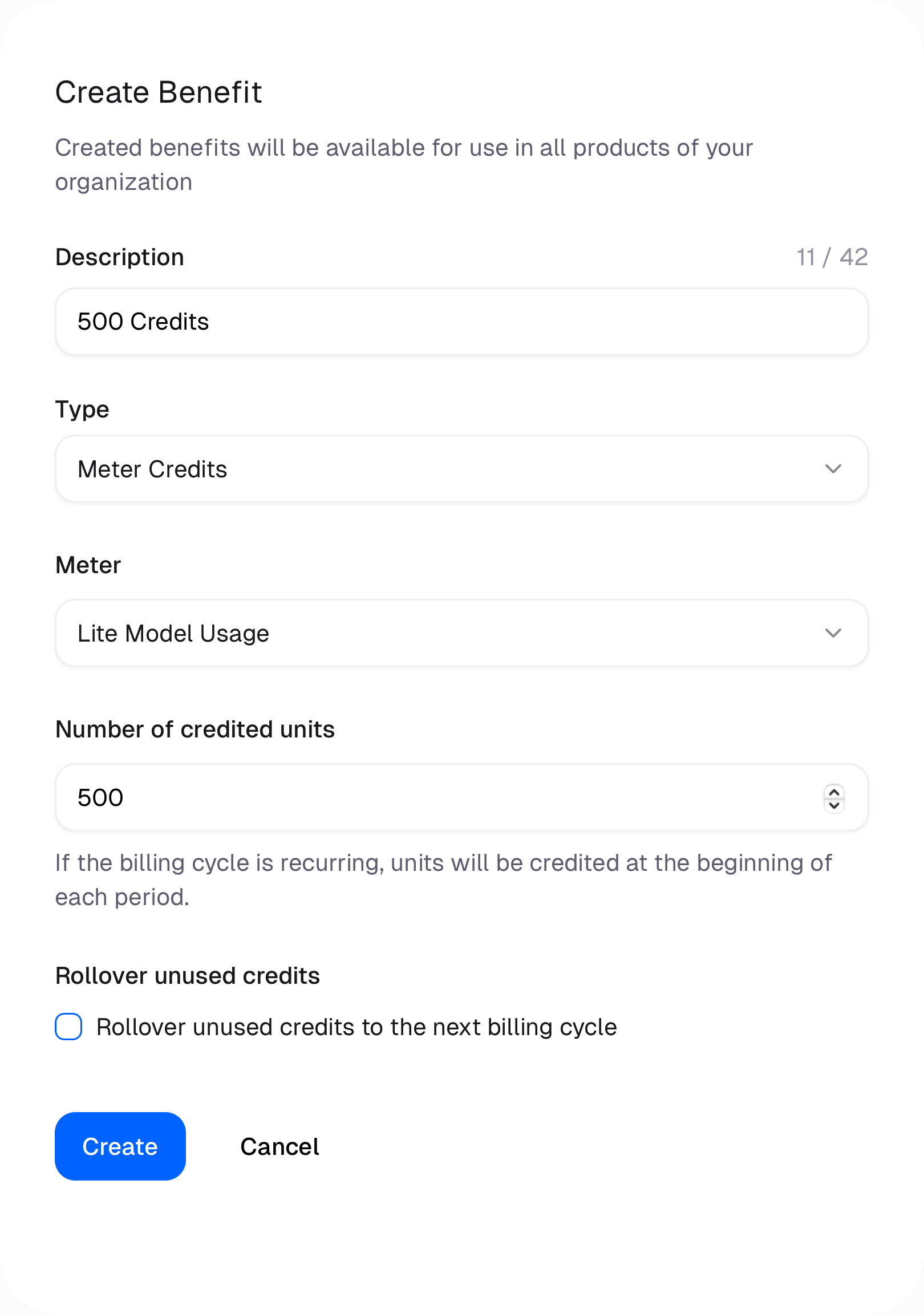
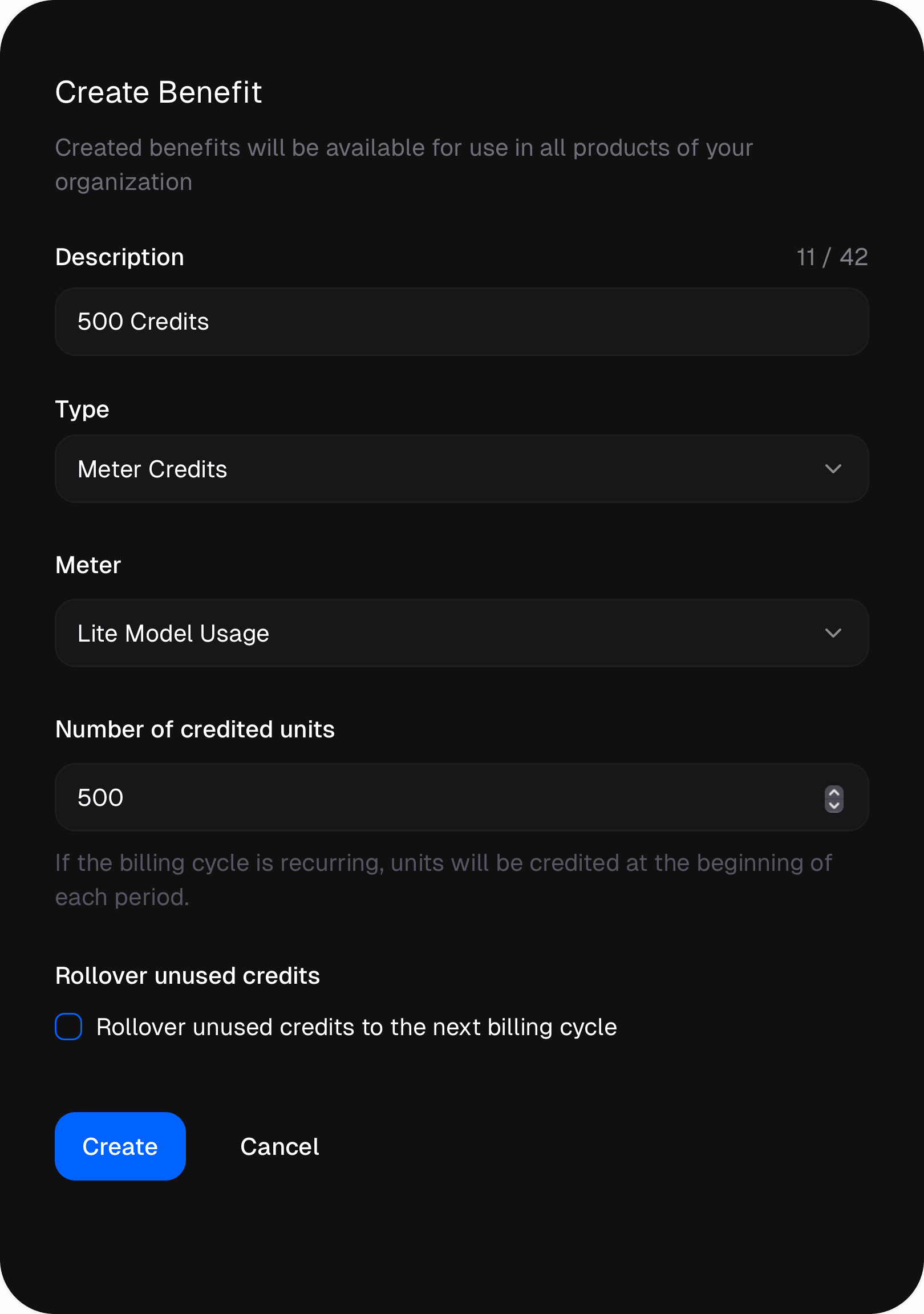 When the credit lands depends on the product type:
| Product type | When the customer is credited |
| ------------ | ----------------------------------------------------------- |
| Subscription | At the start of **every billing cycle** (monthly or yearly) |
| One-time | **Once**, at the moment of purchase |
For example, a "Starter" subscription that grants `10000` units each month refreshes the customer to a full balance on every renewal, while a "Credit pack" one-time product drops a fixed `50000` units in once and lets them spend it down at their own pace.
To grant credits programmatically — say, after a manual top-up or an account-management action rather than a purchase — follow the [grant meter credits guide](/guides/grant-meter-credits-after-purchase).
## Reading the balance
Your application almost always needs to know how much a customer has left. Two ways to get it:
One call returns a full snapshot of the customer, including the live balance
of every active meter. Best when you already fetch customer state on login.
Query meter balances directly when you only need usage figures — ideal for a
usage widget or a pre-flight balance check.
A typical gate in your app: read the balance, and if it's depleted, hold the action or prompt for a top-up.
```ts theme={null}
import { Macropay } from "@macropay/sdk";
const macropay = new Macropay({ accessToken: process.env.MACROPAY_ACCESS_TOKEN });
const state = await macropay.customers.getState({ id: customerId });
const meter = state.activeMeters.find((m) => m.meterId === apiCallsMeterId);
if (!meter || meter.balance <= 0) {
throw new Error("No credits remaining — prompt the customer to top up.");
}
// Balance is healthy — serve the request and ingest the usage event.
```
## Credits for AI and agent usage
Prepaid credits map cleanly onto AI workloads, where a single customer action can fan out into unpredictable token spend. Sell a customer a block of credits, meter their consumption, and let the balance absorb the variance instead of issuing a volatile invoice each month.
* **Token usage:** route traffic through the [AI proxy](/features/usage-based-billing/introduction) so token cost is captured automatically, then draw it from the prepaid balance.
* **Agent activity and outcomes:** ingest agent signals, meter them, and bill prepaid credits against completed actions or delivered outcomes — pairing nicely with value receipts that certify the ROI behind each draw-down.
This keeps **agentic margin** legible: prepaid revenue on one side, the underlying AI cost on the other.
Macropay does **not** block usage when a customer exhausts their balance. The
meter keeps counting and, if a metered price is attached, overage is billed.
Enforcing a hard stop — rejecting requests once the balance hits 0 — is your
application's responsibility.
When the credit lands depends on the product type:
| Product type | When the customer is credited |
| ------------ | ----------------------------------------------------------- |
| Subscription | At the start of **every billing cycle** (monthly or yearly) |
| One-time | **Once**, at the moment of purchase |
For example, a "Starter" subscription that grants `10000` units each month refreshes the customer to a full balance on every renewal, while a "Credit pack" one-time product drops a fixed `50000` units in once and lets them spend it down at their own pace.
To grant credits programmatically — say, after a manual top-up or an account-management action rather than a purchase — follow the [grant meter credits guide](/guides/grant-meter-credits-after-purchase).
## Reading the balance
Your application almost always needs to know how much a customer has left. Two ways to get it:
One call returns a full snapshot of the customer, including the live balance
of every active meter. Best when you already fetch customer state on login.
Query meter balances directly when you only need usage figures — ideal for a
usage widget or a pre-flight balance check.
A typical gate in your app: read the balance, and if it's depleted, hold the action or prompt for a top-up.
```ts theme={null}
import { Macropay } from "@macropay/sdk";
const macropay = new Macropay({ accessToken: process.env.MACROPAY_ACCESS_TOKEN });
const state = await macropay.customers.getState({ id: customerId });
const meter = state.activeMeters.find((m) => m.meterId === apiCallsMeterId);
if (!meter || meter.balance <= 0) {
throw new Error("No credits remaining — prompt the customer to top up.");
}
// Balance is healthy — serve the request and ingest the usage event.
```
## Credits for AI and agent usage
Prepaid credits map cleanly onto AI workloads, where a single customer action can fan out into unpredictable token spend. Sell a customer a block of credits, meter their consumption, and let the balance absorb the variance instead of issuing a volatile invoice each month.
* **Token usage:** route traffic through the [AI proxy](/features/usage-based-billing/introduction) so token cost is captured automatically, then draw it from the prepaid balance.
* **Agent activity and outcomes:** ingest agent signals, meter them, and bill prepaid credits against completed actions or delivered outcomes — pairing nicely with value receipts that certify the ROI behind each draw-down.
This keeps **agentic margin** legible: prepaid revenue on one side, the underlying AI cost on the other.
Macropay does **not** block usage when a customer exhausts their balance. The
meter keeps counting and, if a metered price is attached, overage is billed.
Enforcing a hard stop — rejecting requests once the balance hits 0 — is your
application's responsibility.