> ## Documentation Index
> Fetch the complete documentation index at: https://docs.macropay.ai/llms.txt
> Use this file to discover all available pages before exploring further.
# Proration for Subscription Upgrades and Downgrades
> Configure how Macropay charges or credits the price difference when a subscription plan changes — immediately or on the next invoice — via dashboard, OAT API, or SDK.
When a customer switches plans mid-cycle, they've already paid for time they won't use on the old plan — and they owe for time on the new one. **Proration** is how Macropay settles that difference fairly, down to the day.
Because Macropay is the **merchant of record**, every prorated charge and credit is recalculated *with the correct sales tax / VAT for the customer's location*, remitted on your behalf. You change the plan; we handle the tax math, the invoice line items, and the compliance.
## How proration works in Macropay
Whichever proration type you pick, one thing is constant:
The plan switch is **always immediate**. The moment you update the subscription, the customer is on the new product — upgrade or downgrade. Proration only controls **when the price difference is settled**, never *whether* the change takes effect.
You have two settlement behaviors:
| Proration type | Behavior | Settles the difference |
| -------------- | ----------------------- | ---------------------------------------------------------------------- |
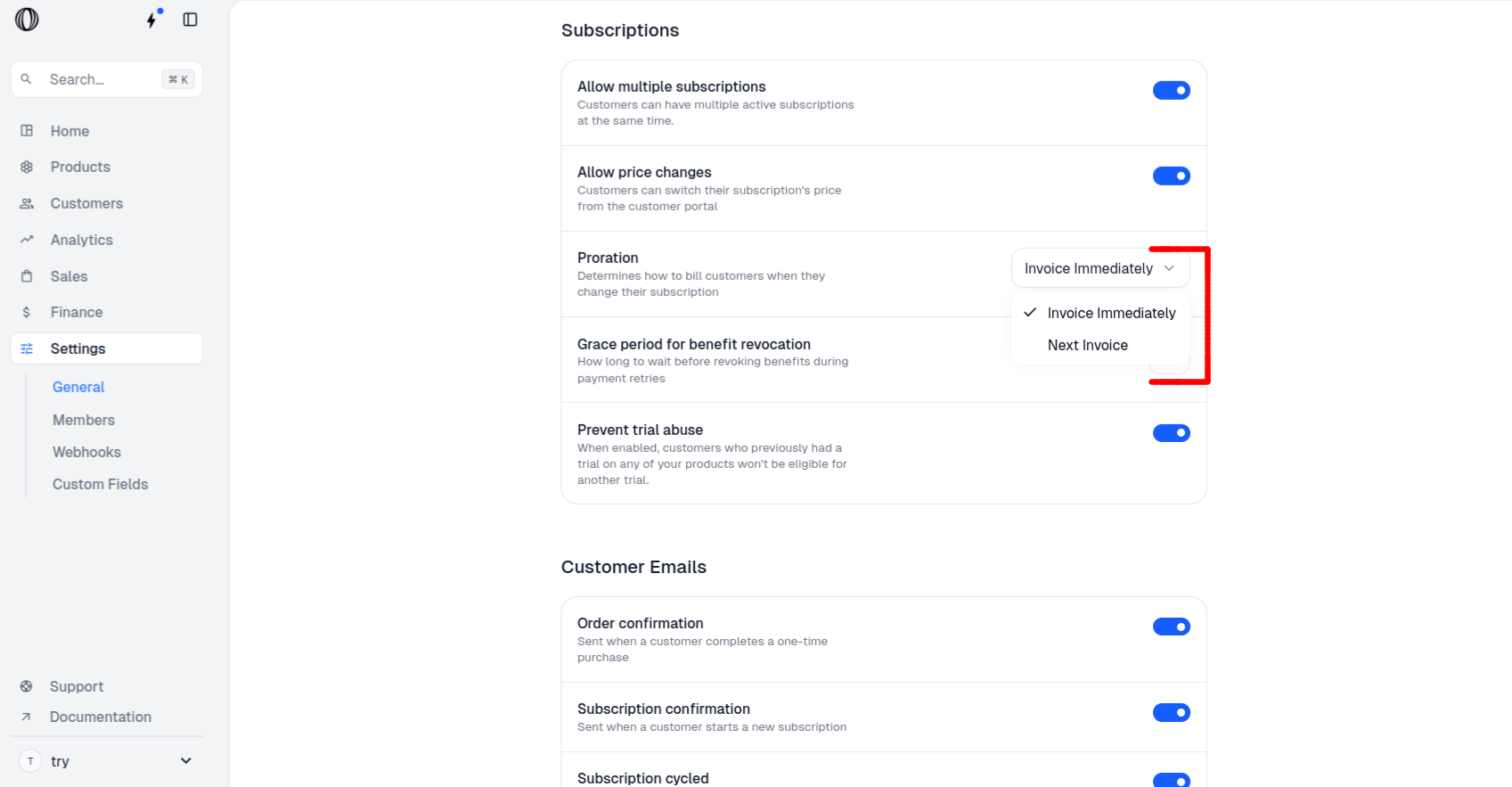
| `invoice` | **Invoice immediately** | A one-off charge (upgrade) or credit (downgrade) is issued right away. |
| `prorate` | **Next invoice** | The adjustment is rolled into the customer's next regular invoice. |
If the **billing interval** changes (for example daily → monthly, or monthly → yearly, or the reverse), proration is **always settled immediately** as `invoice`, even when your default is set to `prorate`.
## Set the default behavior
Pick one default that applies to every plan change in your organization. You can override it per-request through the API (see below).
### From the dashboard
In the Macropay dashboard sidebar, click **Settings**, or go straight to:
`https://macropay.ai/dashboard/${org_slug}/settings`
Scroll to the **Subscriptions** section.
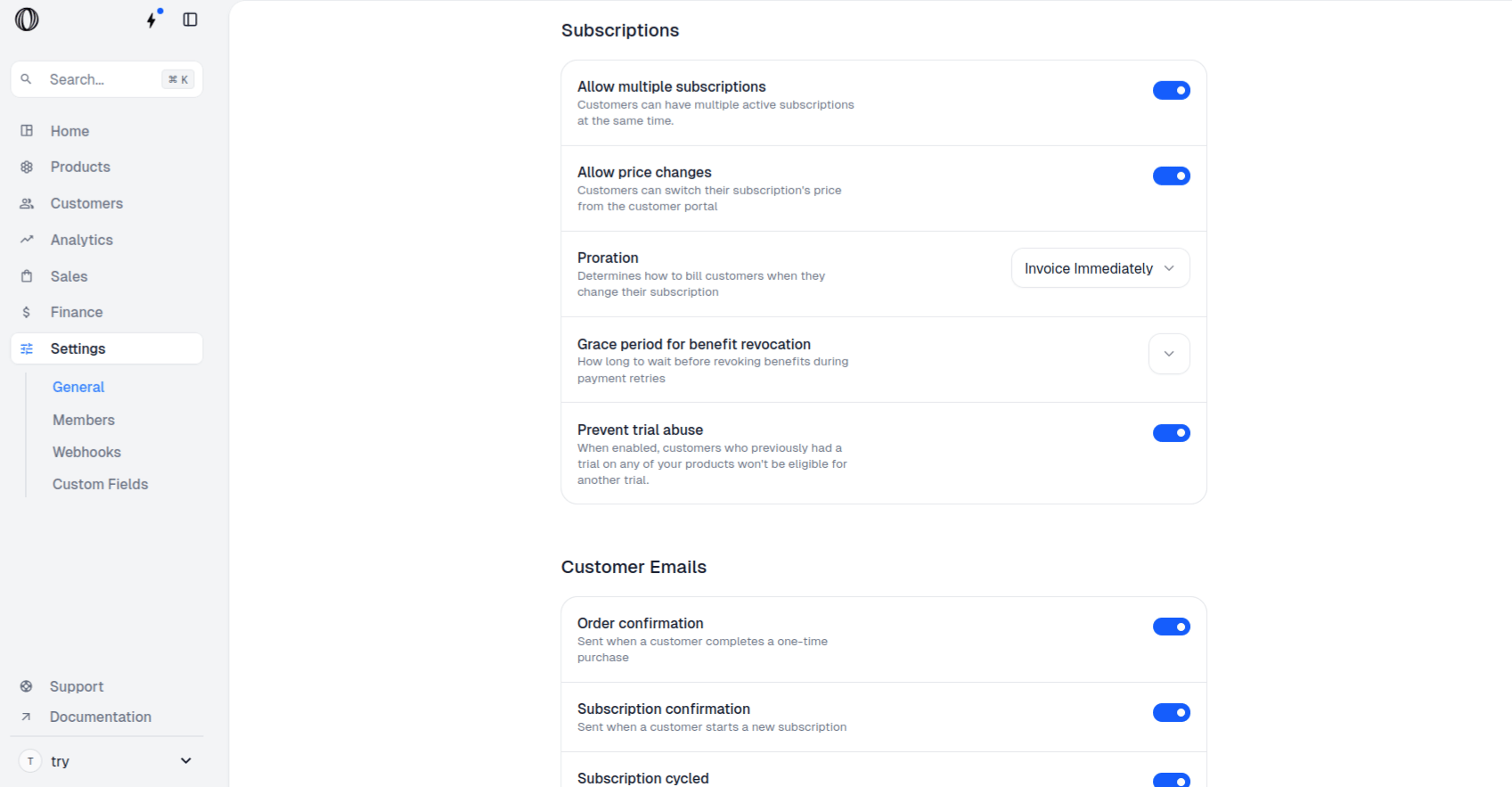 Choose **Invoice Immediately** or **Next invoice**. The change saves on selection.
 ### From the API
Prefer to manage settings programmatically? Update the organization default with the [organization update endpoint](https://docs.macropay.ai/api-reference/organizations/update).
## Change a plan with proration via API
This is the per-subscription path: switch a customer's product and decide, on the spot, how the difference settles.
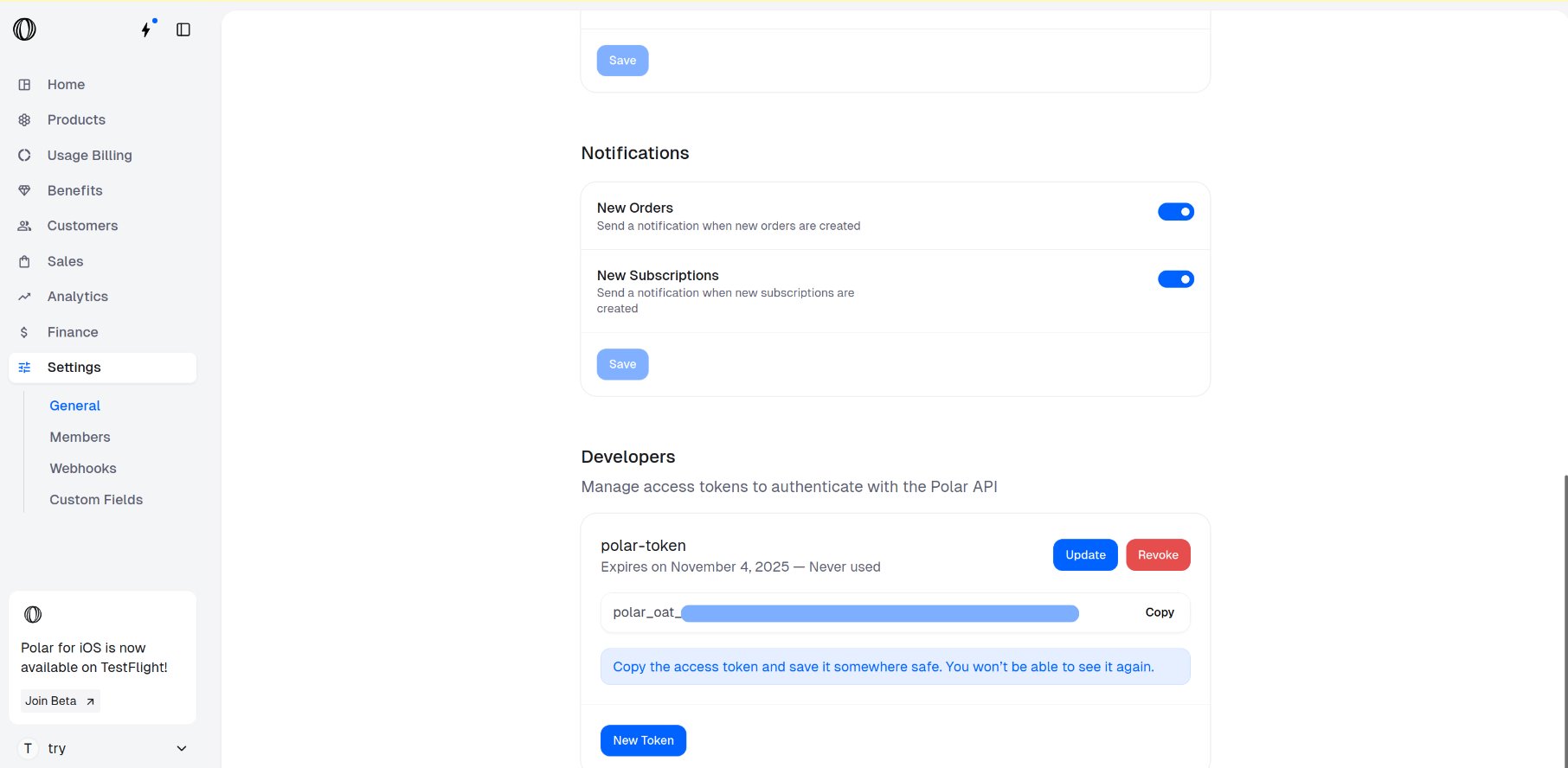
Generate an OAT by following the [organization access tokens guide](https://docs.macropay.ai/integrate/oat).
Copy the token as soon as it's shown — it won't be displayed again.
### From the API
Prefer to manage settings programmatically? Update the organization default with the [organization update endpoint](https://docs.macropay.ai/api-reference/organizations/update).
## Change a plan with proration via API
This is the per-subscription path: switch a customer's product and decide, on the spot, how the difference settles.
Generate an OAT by following the [organization access tokens guide](https://docs.macropay.ai/integrate/oat).
Copy the token as soon as it's shown — it won't be displayed again.
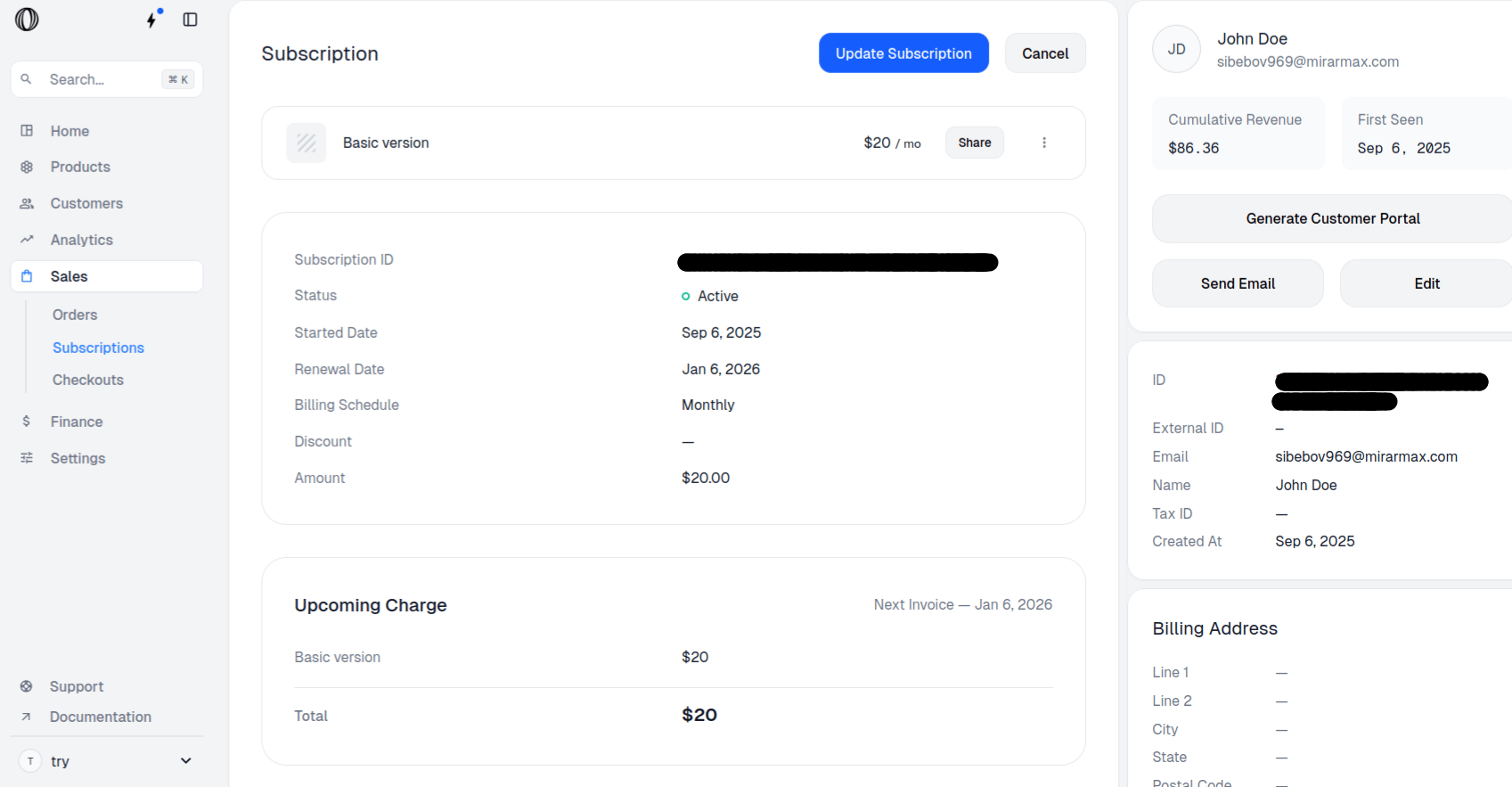
 In the sidebar, go to **Sales › Subscriptions**, or:
`https://macropay.ai/dashboard/${org_slug}/sales/subscriptions`
In the sidebar, go to **Sales › Subscriptions**, or:
`https://macropay.ai/dashboard/${org_slug}/sales/subscriptions`
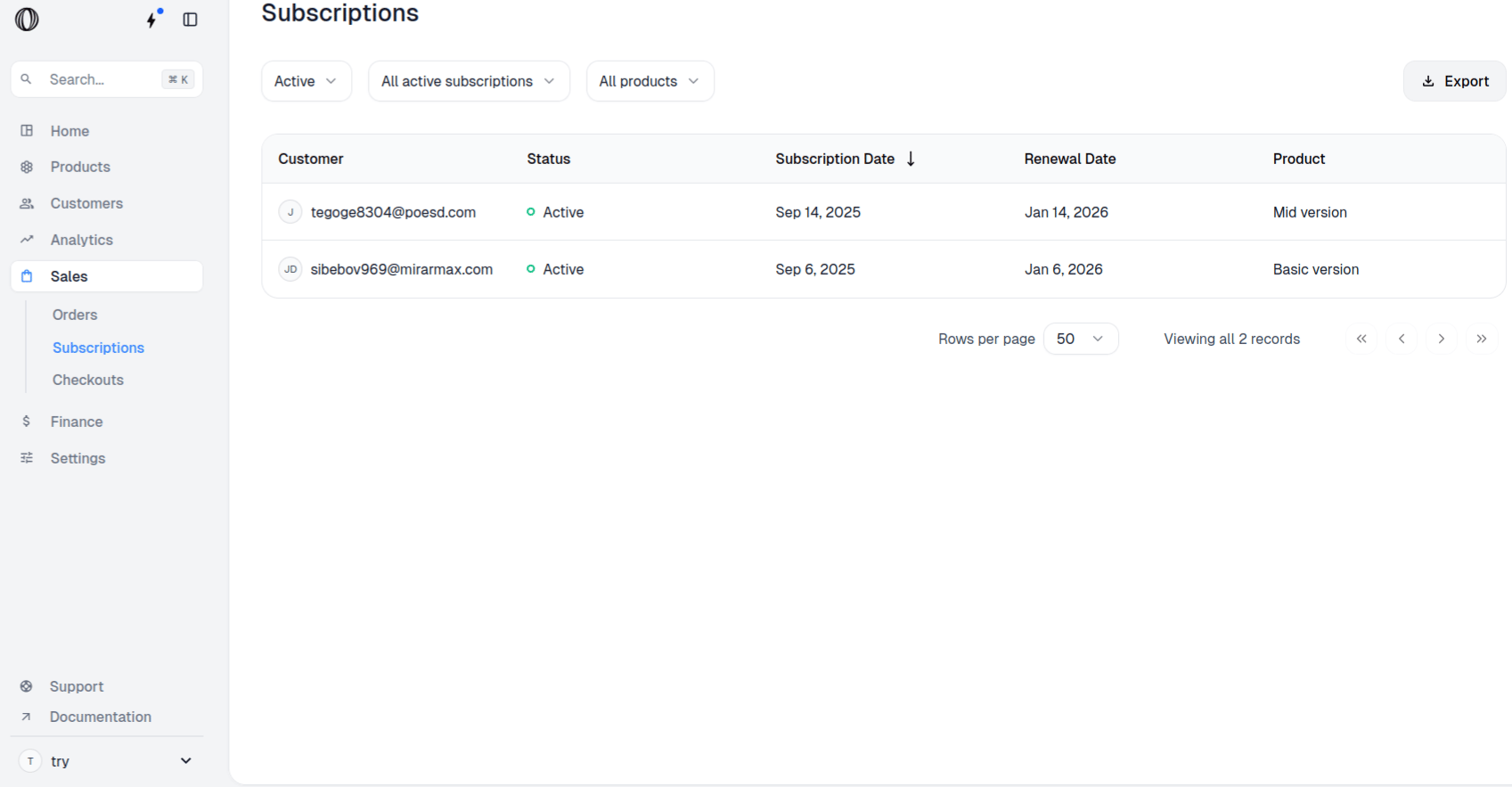 Open the subscription you want to change and copy its **Subscription ID**.
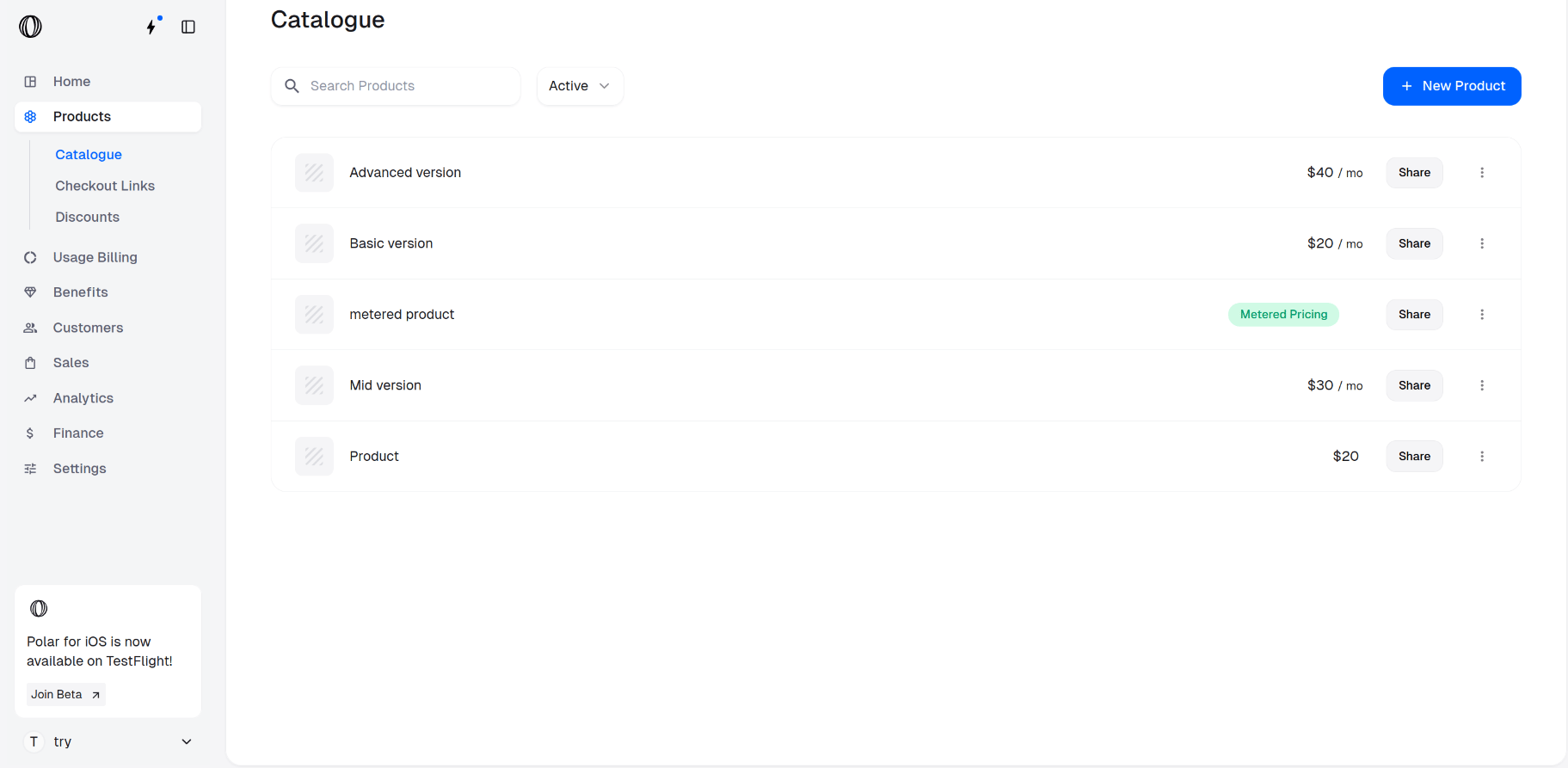
 Go to **Products › Catalogue**, or:
`https://macropay.ai/dashboard/${org_slug}/products`
Go to **Products › Catalogue**, or:
`https://macropay.ai/dashboard/${org_slug}/products`
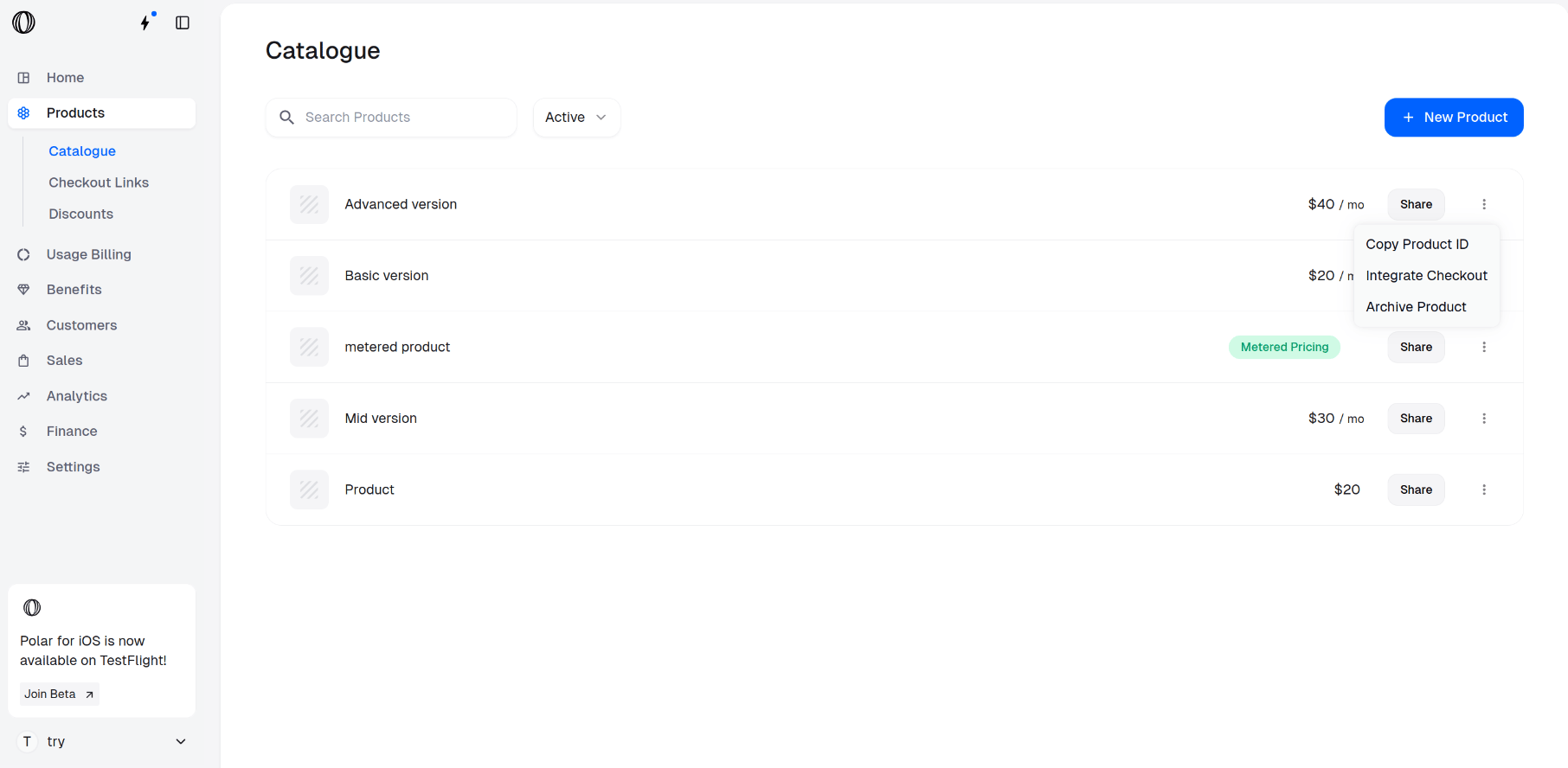
 On the product you're switching the customer *to*, open the **⋮ (More options)** menu and choose **Copy Product ID**.
 Send a `PATCH` to `/v1/subscriptions/{id}`. Replace:
* `` — the subscription being changed
* `` — the product to switch to
* `proration_behavior` — `invoice` (settle now) or `prorate` (settle on next invoice)
```bash cURL theme={null}
curl --request PATCH \
--url https://api.macropay.ai/v1/subscriptions/ \
--header 'Authorization: Bearer ' \
--header 'Content-Type: application/json' \
--data '{
"product_id": "",
"proration_behavior": "invoice"
}'
```
```py Python theme={null}
from macropay import Macropay
with Macropay(
access_token="",
) as macropay:
res = macropay.subscriptions.update(
id="",
subscription_update={
"product_id": "",
"proration_behavior": "invoice", # or "prorate"
},
)
print(res)
```
Building usage-based or agent billing on top of subscriptions? The same model applies. Pair a base plan with metered prices so customers can move tiers mid-cycle while you keep billing by **usage, activity, or outcome** — prorated automatically on the fixed portion.
## Worked examples
To make the math concrete, set up a product with two plans — a **$8/month Starter** and a **$24/month Pro** — following [create product variants](https://docs.macropay.ai/guides/create-variants). Assume a 30-day billing month and that the customer switches on **day 16**, with 15 days remaining.
For a 31-day month, the same logic applies with the remaining-days count adjusted accordingly.
### Upgrading the subscription
Walk through the merchant and customer experience in [subscription upgrades](https://docs.macropay.ai/guides/subscription-upgrades).
**`invoice` — charge the difference now**
The unused Starter time is credited and the remaining Pro time is charged, netted into one immediate invoice.
Send a `PATCH` to `/v1/subscriptions/{id}`. Replace:
* `` — the subscription being changed
* `` — the product to switch to
* `proration_behavior` — `invoice` (settle now) or `prorate` (settle on next invoice)
```bash cURL theme={null}
curl --request PATCH \
--url https://api.macropay.ai/v1/subscriptions/ \
--header 'Authorization: Bearer ' \
--header 'Content-Type: application/json' \
--data '{
"product_id": "",
"proration_behavior": "invoice"
}'
```
```py Python theme={null}
from macropay import Macropay
with Macropay(
access_token="",
) as macropay:
res = macropay.subscriptions.update(
id="",
subscription_update={
"product_id": "",
"proration_behavior": "invoice", # or "prorate"
},
)
print(res)
```
Building usage-based or agent billing on top of subscriptions? The same model applies. Pair a base plan with metered prices so customers can move tiers mid-cycle while you keep billing by **usage, activity, or outcome** — prorated automatically on the fixed portion.
## Worked examples
To make the math concrete, set up a product with two plans — a **$8/month Starter** and a **$24/month Pro** — following [create product variants](https://docs.macropay.ai/guides/create-variants). Assume a 30-day billing month and that the customer switches on **day 16**, with 15 days remaining.
For a 31-day month, the same logic applies with the remaining-days count adjusted accordingly.
### Upgrading the subscription
Walk through the merchant and customer experience in [subscription upgrades](https://docs.macropay.ai/guides/subscription-upgrades).
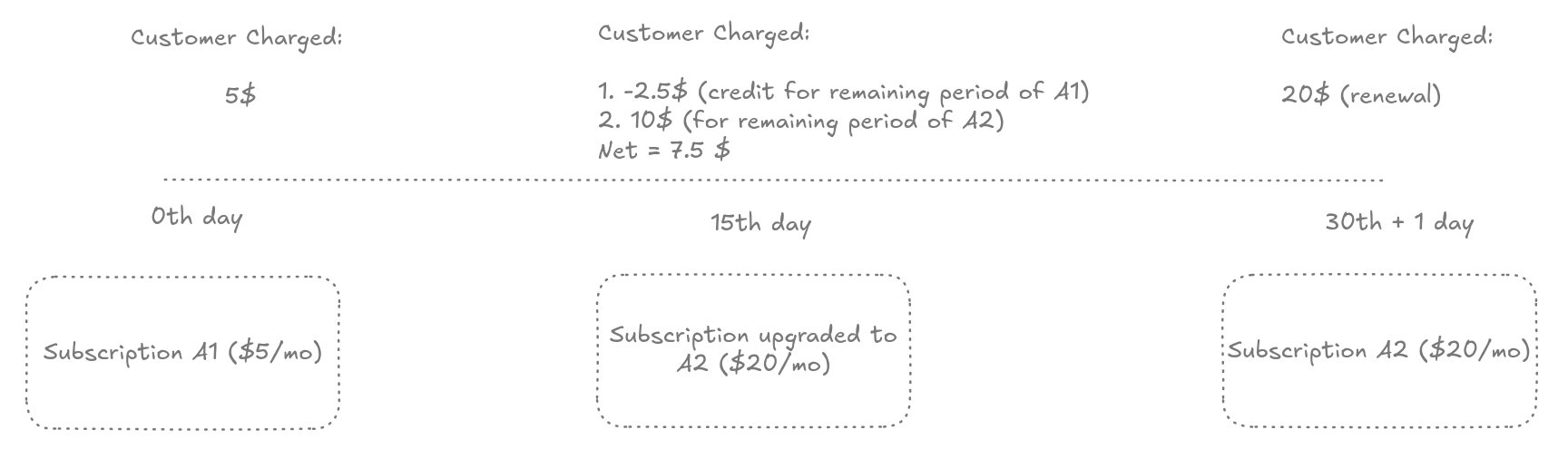
**`invoice` — charge the difference now**
The unused Starter time is credited and the remaining Pro time is charged, netted into one immediate invoice.
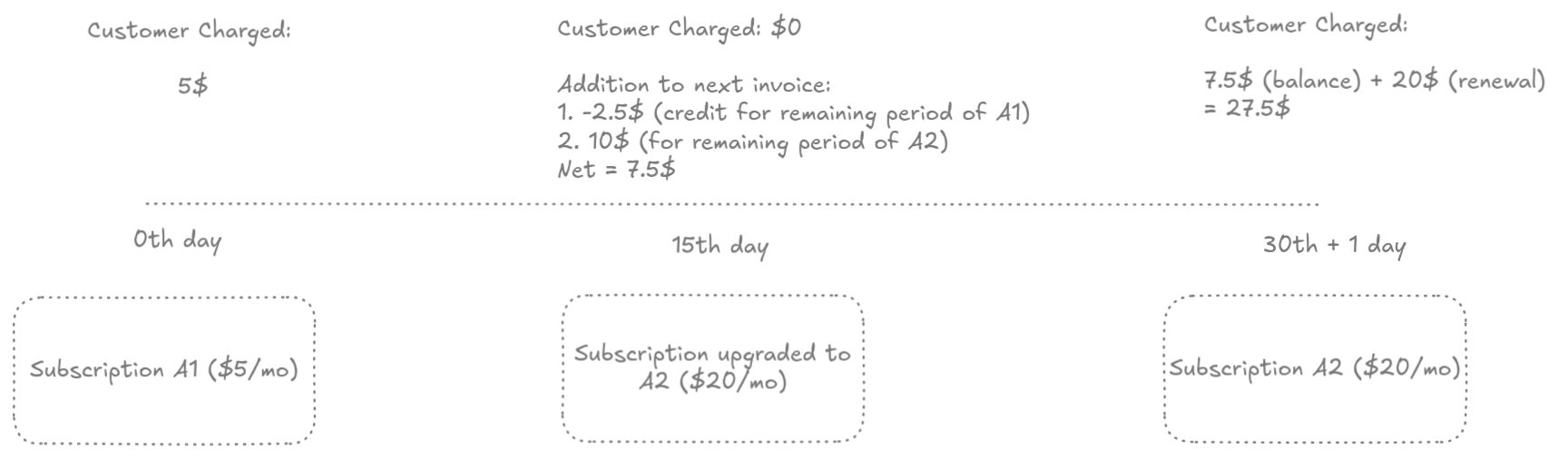
 **`prorate` — charge the difference on the next invoice**
The same net amount is calculated, but it lands on the customer's next regular invoice instead of being billed today.
**`prorate` — charge the difference on the next invoice**
The same net amount is calculated, but it lands on the customer's next regular invoice instead of being billed today.
 ### Downgrading the subscription
Walk through the full flow in [subscription downgrades](https://docs.macropay.ai/guides/subscription-downgrades).
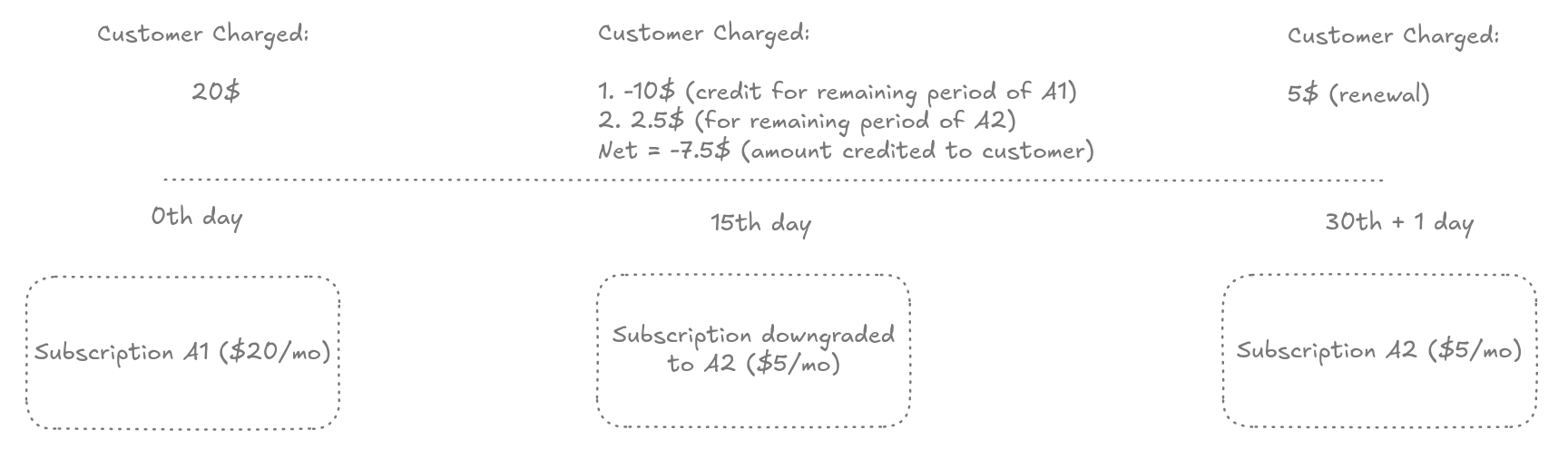
**`invoice` — credit the difference now**
The unused Pro time is credited against the remaining Starter cost and applied immediately.
### Downgrading the subscription
Walk through the full flow in [subscription downgrades](https://docs.macropay.ai/guides/subscription-downgrades).
**`invoice` — credit the difference now**
The unused Pro time is credited against the remaining Starter cost and applied immediately.
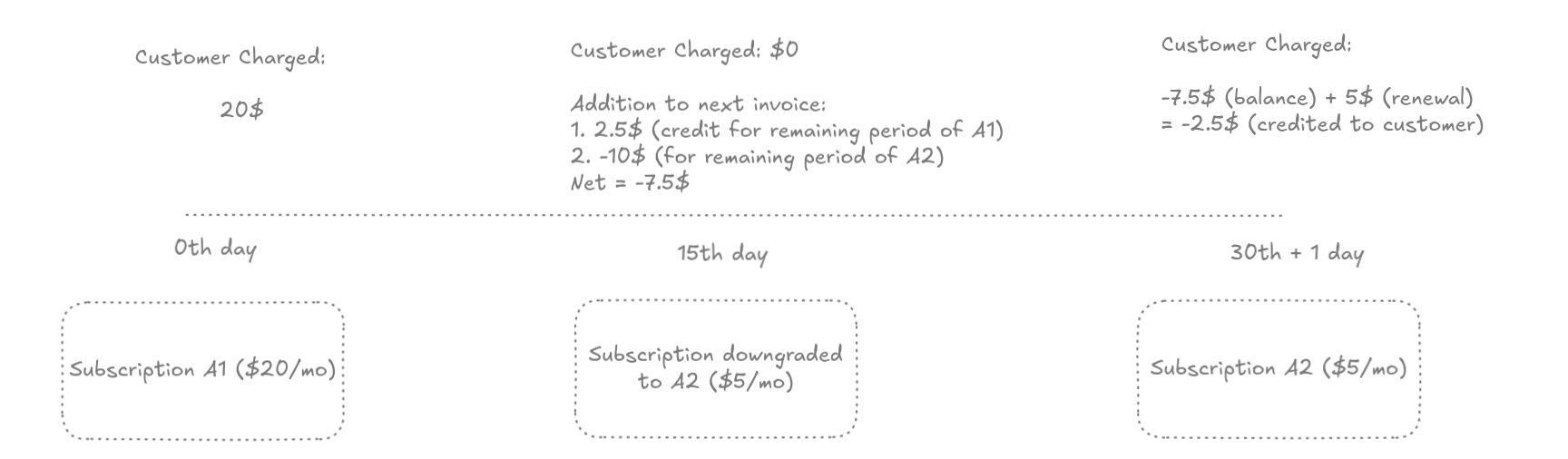
 **`prorate` — credit the difference on the next invoice**
The same credit is deferred and reflected on the next regular invoice.
**`prorate` — credit the difference on the next invoice**
The same credit is deferred and reflected on the next regular invoice.
 Remember: any change that also changes the **billing interval** is settled immediately as `invoice`, regardless of your default or the `proration_behavior` you pass.