> ## Documentation Index
> Fetch the complete documentation index at: https://docs.macropay.ai/llms.txt
> Use this file to discover all available pages before exploring further.
# OAuth 2.0 Connect
> Let your app act on behalf of Macropay users with OpenID Connect — organization-scoped tokens, PKCE for public clients, and refreshable access.
OAuth 2.0 is how your application acts **on behalf of another Macropay user** —
reading their orders, creating products, or wiring billing into their account
without ever touching their password. It's built on the standard
[OpenID Connect](https://openid.net/specs/openid-connect-core-1_0.html#AuthRequest)
authorization-code flow, so any OAuth-aware HTTP client works out of the box.
If you only need to call the API for **your own** organization, an Organization
Access Token is simpler — reach for OAuth when you're building a multi-tenant
integration (a Slack app, a Framer plugin, an agent that bills across many
accounts).
By default Macropay issues **organization-scoped** tokens. A token can only
read and write the data of the single organization the user picked during
consent — least-privilege by default, which keeps each tenant's revenue,
customers, and payouts isolated.
## The flow at a glance
Send the user to Macropay's consent screen with your client ID and scopes.
They approve the requested scopes and select an organization. Macropay
redirects back to your `redirect_uri` with a one-time `code`.
`POST` the code to the token endpoint to receive an `access_token`,
`refresh_token`, and `id_token`.
Send the access token as a `Bearer` credential on every request.
## 1. Send the user to the authorization URL
Start the flow by redirecting the user to:
```
https://macropay.ai/oauth2/authorize?
response_type=code
&client_id=CLIENT_ID
&redirect_uri=https%3A%2F%2Fexample.com%2Fcallback
&scope=openid%20email
```
Parameters follow the
[OpenID Connect authentication request](https://openid.net/specs/openid-connect-core-1_0.html#AuthRequest).
The ones you'll set on every request:
Selects the authorization-code flow — the only flow Macropay supports, and the
right choice for server-side and PKCE-protected clients alike.
The Client ID issued when you registered your OAuth 2.0 client.
Where Macropay returns the user after consent. It must exactly match one of
the redirect URIs you registered on the client.
A space-separated list of scopes to request. Each must be among the scopes you
declared on the client.
The user lands on a consent screen listing the access you asked for. Because
tokens are organization-scoped by default, they're also prompted to choose which
of their organizations to connect:
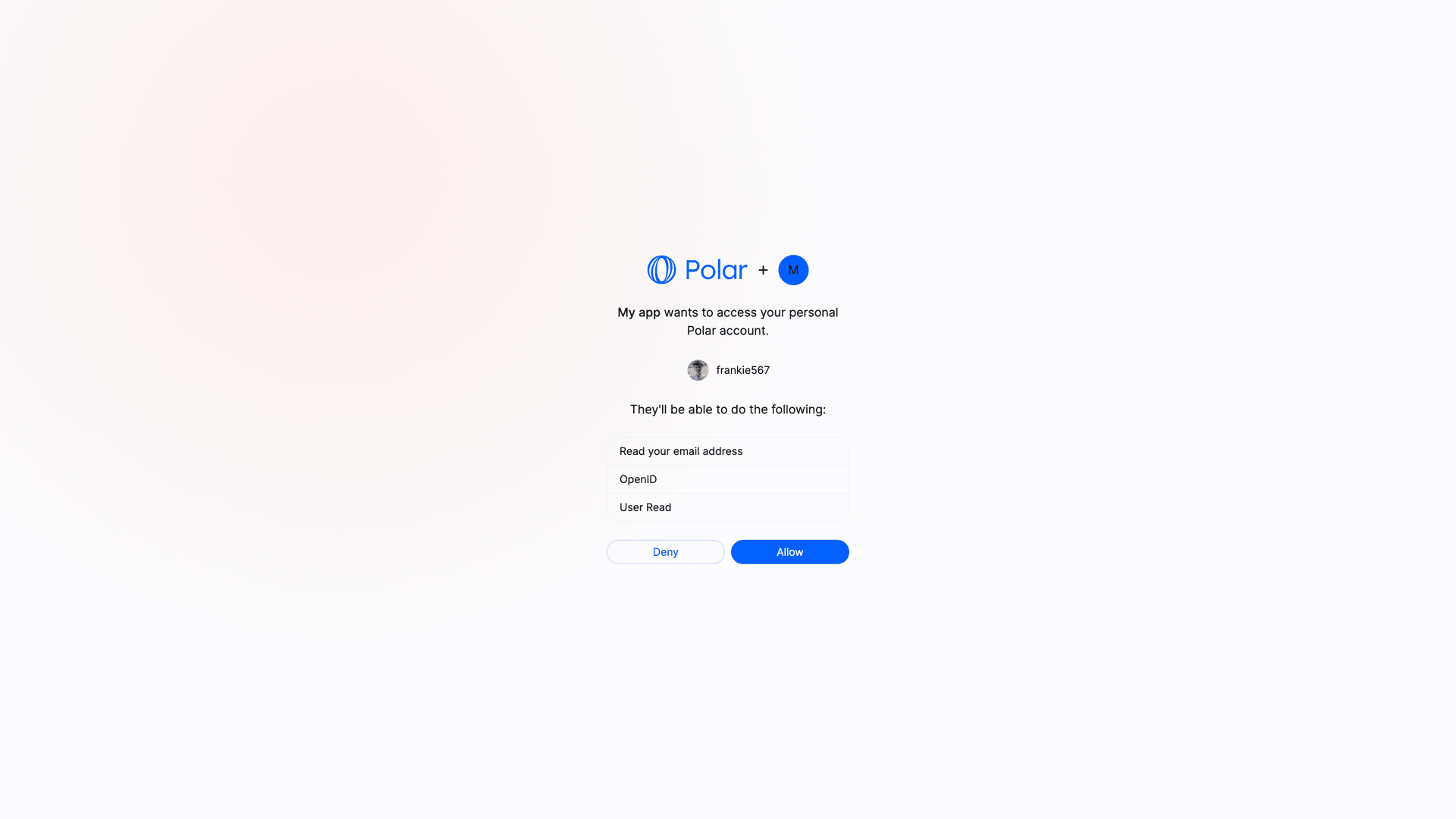 Approve and pick an organization, and Macropay redirects to your `redirect_uri`
with a single-use `code` in the query string — ready to exchange for tokens.
## 2. Exchange the code for an access token
`POST` the authorization code to the token endpoint, authenticating with your
Client ID and Client Secret:
```bash Terminal theme={null}
curl -X POST https://api.macropay.ai/v1/oauth2/token \
-H 'Content-Type: application/x-www-form-urlencoded' \
-d 'grant_type=authorization_code&code=AUTHORIZATION_CODE&client_id=CLIENT_ID&client_secret=CLIENT_SECRET&redirect_uri=https://example.com/callback'
```
A successful response returns the token set:
```json theme={null}
{
"token_type": "Bearer",
"access_token": "macropay_at_XXX",
"expires_in": 864000,
"refresh_token": "macropay_rt_XXX",
"scope": "openid email",
"id_token": "ID_TOKEN"
}
```
| Field | What it's for |
| --------------- | -------------------------------------------------------------------------------------------------------------------------------------- |
| `access_token` | Authenticates API calls on the user's behalf. Expires after `expires_in` seconds. |
| `refresh_token` | Long-lived — exchange it for a fresh `access_token` when the current one expires. |
| `id_token` | Signed JWT describing the user, per the [OpenID Connect ID token spec](https://openid.net/specs/openid-connect-core-1_0.html#IDToken). |
## 3. Call the API on the user's behalf
Pass the access token as a `Bearer` credential. This works the same whether the
token came from this OAuth flow or from an Organization Access Token:
```bash Terminal theme={null}
curl -X GET https://api.macropay.ai/v1/oauth2/userinfo \
-H 'Authorization: Bearer macropay_at_XXX'
```
From here the token carries the permissions of the connected organization — so
the same credential that reads `userinfo` can create products, open checkout
sessions, or ingest agent usage signals, all attributed to that tenant.
## Organization vs. user tokens
The default flow yields an **organization-level** token. The user selects one
organization at consent time, and the token can only act on that organization's
data:
```
https://macropay.ai/oauth2/authorize?response_type=code&client_id=macropay_ci_j3X95_MgfdSCeCd2qkFnUw&redirect_uri=https%3A%2F%2Fexample.com%2Fcallback&scope=openid%20email
```
To skip organization selection and mint a **user-scoped** token, add
`sub_type=user`:
```
https://macropay.ai/oauth2/authorize?response_type=code&client_id=macropay_ci_j3X95_MgfdSCeCd2qkFnUw&redirect_uri=https%3A%2F%2Fexample.com%2Fcallback&scope=openid%20email&sub_type=user
```
Everything else is identical — only the subject the resulting token is bound to
changes.
Stick with the default organization scope unless you specifically need a
user-bound token. Per-organization isolation maps cleanly onto Macropay's
Merchant-of-Record model, where each organization is its own seller of record
with its own tax, payouts, and dispute handling.
## Public clients
A **public client** is one that can't keep a Client Secret confidential —
single-page apps, mobile apps, or anything running on the end user's device.
When (and only when) a client is registered as a public client, the token
request omits `client_secret`. In its place,
[PKCE](https://oauth.net/2/pkce/) is **required** to protect the
authorization-code exchange against interception.
Approve and pick an organization, and Macropay redirects to your `redirect_uri`
with a single-use `code` in the query string — ready to exchange for tokens.
## 2. Exchange the code for an access token
`POST` the authorization code to the token endpoint, authenticating with your
Client ID and Client Secret:
```bash Terminal theme={null}
curl -X POST https://api.macropay.ai/v1/oauth2/token \
-H 'Content-Type: application/x-www-form-urlencoded' \
-d 'grant_type=authorization_code&code=AUTHORIZATION_CODE&client_id=CLIENT_ID&client_secret=CLIENT_SECRET&redirect_uri=https://example.com/callback'
```
A successful response returns the token set:
```json theme={null}
{
"token_type": "Bearer",
"access_token": "macropay_at_XXX",
"expires_in": 864000,
"refresh_token": "macropay_rt_XXX",
"scope": "openid email",
"id_token": "ID_TOKEN"
}
```
| Field | What it's for |
| --------------- | -------------------------------------------------------------------------------------------------------------------------------------- |
| `access_token` | Authenticates API calls on the user's behalf. Expires after `expires_in` seconds. |
| `refresh_token` | Long-lived — exchange it for a fresh `access_token` when the current one expires. |
| `id_token` | Signed JWT describing the user, per the [OpenID Connect ID token spec](https://openid.net/specs/openid-connect-core-1_0.html#IDToken). |
## 3. Call the API on the user's behalf
Pass the access token as a `Bearer` credential. This works the same whether the
token came from this OAuth flow or from an Organization Access Token:
```bash Terminal theme={null}
curl -X GET https://api.macropay.ai/v1/oauth2/userinfo \
-H 'Authorization: Bearer macropay_at_XXX'
```
From here the token carries the permissions of the connected organization — so
the same credential that reads `userinfo` can create products, open checkout
sessions, or ingest agent usage signals, all attributed to that tenant.
## Organization vs. user tokens
The default flow yields an **organization-level** token. The user selects one
organization at consent time, and the token can only act on that organization's
data:
```
https://macropay.ai/oauth2/authorize?response_type=code&client_id=macropay_ci_j3X95_MgfdSCeCd2qkFnUw&redirect_uri=https%3A%2F%2Fexample.com%2Fcallback&scope=openid%20email
```
To skip organization selection and mint a **user-scoped** token, add
`sub_type=user`:
```
https://macropay.ai/oauth2/authorize?response_type=code&client_id=macropay_ci_j3X95_MgfdSCeCd2qkFnUw&redirect_uri=https%3A%2F%2Fexample.com%2Fcallback&scope=openid%20email&sub_type=user
```
Everything else is identical — only the subject the resulting token is bound to
changes.
Stick with the default organization scope unless you specifically need a
user-bound token. Per-organization isolation maps cleanly onto Macropay's
Merchant-of-Record model, where each organization is its own seller of record
with its own tax, payouts, and dispute handling.
## Public clients
A **public client** is one that can't keep a Client Secret confidential —
single-page apps, mobile apps, or anything running on the end user's device.
When (and only when) a client is registered as a public client, the token
request omits `client_secret`. In its place,
[PKCE](https://oauth.net/2/pkce/) is **required** to protect the
authorization-code exchange against interception.